
BYTECURVE RESOURCES
Driver Scheduling Software for School Bus Operations: Why Dispatch Belongs on the Same Screen


Trusted by the Finest Names in School Bus Transportation

Student Transit Wisconsin

Fremont California School District

Renton Public Schools Washington
It is 5:32 AM. Two drivers just called in sick. A field trip request came in yesterday that nobody entered into the schedule. The substitute list is a paper binder in the dispatch office, and the whiteboard showing today’s assignments was last updated at 4:00 PM the day before.
This is not a worst-case scenario. For most school districts, this is Tuesday.
The root cause is not a lack of effort. It is a lack of integration. Driver scheduling lives in one system, or, more often, a spreadsheet. Dispatch lives on a whiteboard or in a separate application. Payroll lives in a third system that requires someone to manually reconcile hours at the end of every week. Each system works in isolation. The people who use them spend their mornings stitching them together by hand.
Driver scheduling software for school bus operations was built to end this daily chaos. When it operates from the same real-time dashboard as dispatch, that frantic morning scramble becomes a smooth two-minute workflow. And when payroll connects seamlessly to both, the 30-hour weekly reconciliation disappears entirely.
Integrated Student Transportation Software
The Problem With Separate Systems for Scheduling and Dispatch
The disconnect between scheduling and dispatch is where most operational breakdowns start. A driver is scheduled for Route 14. But the dispatcher reassigned them to Route 7 this morning because another driver is absent. The schedule says one thing. The road says another. The payroll system has no idea which is true.
At Renton School District 403 in Washington, a team managing 100 drivers and 12,000 students lived in this gap every day. Spreadsheets tracked assignments. Whiteboards tracked changes. Group texts delivered updates to drivers, sometimes.
“We’re in the customer service business,” said Gregory Dutton, describing what changed after moving to a centralized dashboard where scheduling and dispatch shared the same screen.
The problem scales with fleet size. 83% of school districts now divert non-transportation staff to drive buses at least a few times per year. When teachers and coaches are filling driver seats, the scheduling complexity multiplies. These are not career drivers with memorized routes. They need assignments delivered clearly, updated in real time, and tracked for payroll. A whiteboard cannot do that.
The U.S. school bus driver workforce dropped from 232,000 to 202,000 since 2020. Smaller teams mean every scheduling decision matters more. A missed reassignment does not just inconvenience a dispatcher; it leaves students standing at a bus stop.
Bus Scheduling Software That Handles the Real Day, Not Just the Planned Day
Static scheduling, which means assigning drivers to routes once and printing them out, works until reality intervenes. And reality intervenes every single day.
At Russellville School District in Arkansas, 65+ buses cover 99 square miles serving 5,694 students across 250+ runs per week, including trips and shuttles. A static schedule cannot absorb that volume of daily variation. Field trips get added. Drivers swap shifts. Routes merge when ridership drops on certain days. The schedule is a living document that changes before the first bus rolls.
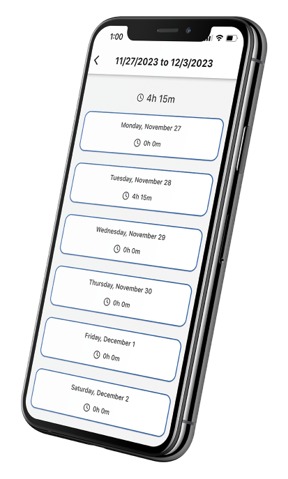
Driver scheduling software for school bus operations treats the schedule as a starting point, not a finished product. Drag-and-drop reassignment lets dispatchers move drivers between routes in seconds. Changes push to drivers’ phones through the DriveOn app instantly, no group text, no radio call, no hoping the substitute checks the whiteboard before leaving the lot.
At Russellville, DriveOn achieved 95% driver adoption. “All those 10 minutes here and 15 minutes there really do add up. It’s wonderful peace of mind,” said Christopher King, Transportation Coordinator. The schedule is always current. The drivers always know their assignments. The dispatcher is not spending the first hour of every morning on the phone.
“All those 10 minutes here and 15 minutes there, those really do add up. And it’s just wonderful peace of mind to know the drivers and the admin staff are on the same page for timesheets.”
Scheduling Software for Transportation That Connects to Payroll
This is where the financial case gets concrete. When scheduling and payroll operate in separate systems, someone has to bridge the gap manually. That bridge is usually a payroll clerk spending 20-30 hours per week reconciling paper timesheets against route assignments, resolving discrepancies, and entering data into the payroll system.
When scheduling software feeds directly into time and attendance, that bridge disappears. The driver reassigned from Route 14 to Route 7 clocks in via DriveOn. GPS verifies the clock-in. The system records which route they actually drove, when they started, and when they finished. Payroll pulls from the same data. No manual entry. No reconciliation. No disputes.
At Rome City Schools in Georgia, 106 transportation employees were generating enough timesheet errors and administrative overhead to cost the district $300,000 per year. Automated scheduling-to-payroll integration eliminated that waste. “We never expected this level of savings, but our business office was thrilled,” said Elander Graham, Transportation Director.
At Russellville, the same integration cut monthly payroll processing time by 80% and delivered $15,000 per month in labor cost savings, even after the district raised driver wages to improve retention.
Transit Driver Scheduling Software With GPS-Verified Clock-In
GPS verification is the mechanism that makes automated payroll trustworthy. A driver opens DriveOn. The app records their location at clock-in. Hours are calculated from actual GPS-verified start and stop times, not from a timesheet filled out at the end of the day from memory.
This eliminates the two most common payroll problems in student transportation: buddy-punching (one driver clocking in for another) and timesheet inflation (rounding hours up, forgetting exact start times). Paper timesheets depend on a driver remembering, at the end of a shift, exactly when they started and stopped. GPS verification removes memory from the equation entirely. When over 40,000 drivers use the same clock-in system daily across 20+ states, the data is consistent, verifiable, and audit-ready.
At South Bend Community Schools in Indiana, the shift from manual timesheets to GPS-verified scheduling data cut payroll processing from 30 hours per week to 1-2 hours. “It was a challenging process that never got better until we got Bytecurve,” said Nancy Halterman.
“In just that one example, Bytecurve paid for itself about three times over. Bytecurve listened to every word we had to say. They’re just really, really good partners.”
Dispatch Software for Transportation: One Dashboard for Every Morning Decision
Dispatch is the real-time side of scheduling. The schedule says what should happen. Dispatch manages what is actually happening. When both live on the same screen, the dispatcher sees the gap between plan and reality instantly and closes it.
Driver scheduling software for school bus operations delivers exactly that unified experience through a centralized scheduling and dispatch dashboard. It combines four data streams that most districts currently manage separately: route assignments, driver status, GPS vehicle positions, and real-time alerts for late or absent drivers. The dispatcher does not need to check one system for who is assigned, another for who clocked in, and a third for where the buses are. It is all on one screen.
Route data says Bus 42 picks up 38 students on Oak Street at 7:15 AM. GPS says Bus 42 is still at the maintenance yard. The dispatcher sees both facts simultaneously, reassigns the route to an available driver with two clicks, and the new assignment appears on that driver’s phone before they leave the lot.
At South Bend, this unified view transformed daily operations. The same data that powered real-time dispatch also fed payroll automatically, which eliminated the 30-hour weekly reconciliation that had plagued the department for years.
Driver Scheduling App That Puts Routes in Drivers’ Hands
The dashboard serves dispatchers. The app serves drivers. Both pull from the same data.
DriveOn delivers route assignments, schedule changes, and task updates directly to drivers’ phones. Driver communications happen through the platform, not through group texts or radio calls that get missed. When a dispatcher reassigns a route, the driver sees it immediately. When a driver clocks in, the dispatcher sees it immediately. The information flows both ways because both sides share the same system.
45,000+ buses across 20+ states run on this integration today. The driver app is not an add-on bolted onto a separate scheduling system. It is the driver-facing side of the same dashboard that the dispatcher uses.
What Changes When Scheduling and Dispatch Share a Dashboard
The 5:32 AM scenario from the opening of this article plays out differently.
Two drivers call in sick. The dispatcher opens the dashboard, sees which substitutes are available, drags them onto the open routes, and the assignments appear on their phones. The field trip request from yesterday is already in the system because the office entered it through the same platform. Payroll will calculate itself from GPS-verified clock-in data at the end of the pay period. Total time from first alert to resolution: two minutes.
Student Transit in Wisconsin, managing roughly 500 buses across three districts, described this shift as “Centralized Command, Centralized Control.”
“You don’t know what you don’t know. And you might not know what you need until you see it for yourself,” said Martin Klukas of Student Transit.
Districts managing 26 million students on school buses every day cannot afford to run scheduling, dispatch, and payroll as three separate manual processes. The operational cost is measured in hours per week, dollars per year, and students waiting at bus stops.
“We designed Bytecurve to bridge the gap between routing and GPS. Our goal is to create a command-and-control system for transportation leaders,” said GP Singh, Founder and CEO of Bytecurve.
One school bus operating platform. One dashboard. Every decision on one screen.



Russellville saves $15,000 per month in payroll
– Christopher King, Transportation Director, Russellville School District
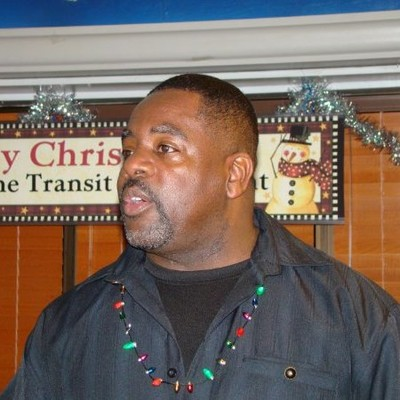

Rome Public Schools reduced payroll by $30,000 per month with Bytecurve
— Elander Graham, Rome Transportation Director
Frequently Asked Questions
What is driver scheduling software for school bus operations?
Driver scheduling software manages the daily assignment of drivers to bus routes, including handling absences, substitutions, shift swaps, and field trip coverage. In school bus operations, it replaces the paper binders, spreadsheets, and whiteboards that most districts use to track who is driving what. Modern platforms like Bytecurve 360 connect scheduling directly to dispatch and payroll, so changes flow through the entire system in real time rather than requiring manual re-entry.
When a driver clocks in through a GPS-verified app like DriveOn, the scheduling system records which route they drove, when they started, and when they finished. That data feeds directly into payroll processing — eliminating manual timesheets and the 20-30 hours per week most districts spend reconciling them. Rome City Schools saves $300,000 per year through this automated connection.
Can scheduling and dispatch software integrate with existing routing systems?
Yes. Bytecurve integrates with existing routing systems, including Transfinder and Tyler Technologies Versatrans, as well as GPS providers, including Zonar, Synovia, CalAmp, and Samsara. The platform adds the scheduling, dispatch, and payroll layer on top of systems districts already own — it does not replace them. Over 45,000 buses across 20+ states run on these integrations today.
How quickly can drivers adopt a new scheduling and dispatch platform?
Districts using Bytecurve’s DriveOn app consistently report 95%+ adoption rates. Russellville School District in Arkansas reached 90% adoption during the initial rollout. The app is designed for drivers who may not be tech-savvy. Just clock in, view route, receive updates. Typical districtwide implementation takes 4-8 weeks. See a scheduling and dispatch demo for your fleet size.

Secure
Only authorized employees will be able to access DriveOn based on a customer specific access code. This code can be turned off as needed by an authorized administrator.

User friendly
DriveOn is easy to use with a simple, smart interface.
Available on both iOS and Google Play stores.